
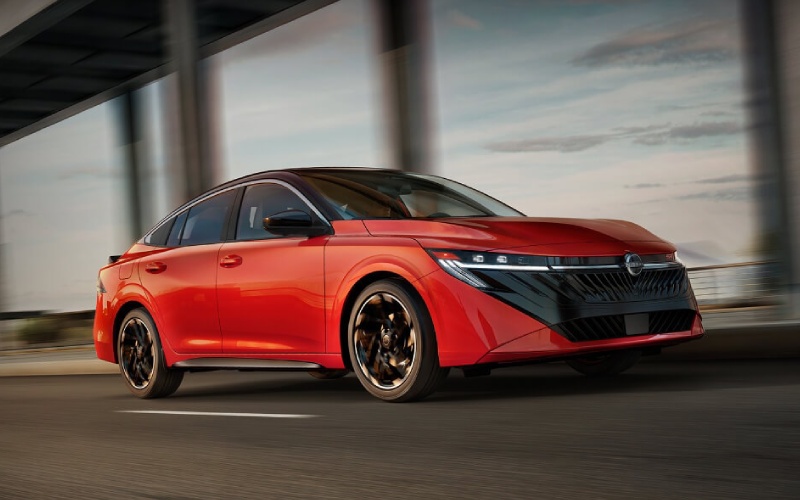
Nissan of Paris - Is Wireless Apple CarPlay® standard on the 2026 Nissan Sentra for drivers near McKenzie, TN?
Drivers around McKenzie, TN appreciate tech that’s as intuitive as their smartphones, and Wireless Apple CarPlay® in the 2026 Sentra® is exactly that kind of convenience. It helps you bring familiar apps—maps, messages, podcasts, music—right to the vehicle’s touch-screen without a cable, so your everyday routine stays uncluttered and connected.
Let’s walk through what Wireless Apple CarPlay® is, how it works in Sentra, what you need to use it, and a few troubleshooting steps so you’re confident from day one. We’ll also touch on Android Auto™ and how it pairs with the rest of NissanConnect® Services for a clean, modern in-cabin experience.
What Wireless Apple CarPlay® Does For Your Drive
Wireless Apple CarPlay® integrates a compatible iPhone® with the Sentra touch-screen, putting core iOS apps in a familiar, glanceable interface. That means you can follow turn-by-turn directions in Apple Maps, answer messages with Siri, and stream your playlists—no cord needed. Because it’s wireless, you keep your phone in your pocket, purse, or the center console and still get full functionality. It’s simple, clean, and designed for focus while driving.
In the 2026 Sentra, Wireless Apple CarPlay® is part of a smart tech ecosystem that also includes the available monolith display with integrated 12.3-inch dual screens and NissanConnect® Services. Taken together, these features help you control the essentials quickly and keep the most important information within easy reach.
What You Need Before You Pair
Before your first drive, make sure a few essentials are ready. Having these set up will help the pairing go quickly and smoothly.
- Compatible iPhone® and iOS: Confirm your iPhone supports CarPlay and is updated to the latest iOS version.
- Bluetooth and Wi-Fi on: Enable Bluetooth and Wi-Fi in your phone’s settings—Wireless Apple CarPlay® uses both.
- Vehicle in Park: Pair while the Sentra is safely parked so you can follow on-screen prompts without distraction.
- Allow permissions: Approve any prompts on your iPhone to enable CarPlay access, Contacts, and Notifications.
If you prefer a guided setup, ask your product specialist to walk you through it the first time; the entire process usually takes just a minute or two.
Step-by-Step: First-Time Setup
After confirming your phone and vehicle settings, pairing typically follows a short sequence:
- Open Settings on iPhone®: Confirm Bluetooth and Wi-Fi are toggled on.
- Start the vehicle: With Sentra on and in Park, open the infotainment menu and select Phone or Apple CarPlay.
- Pair via Bluetooth: Choose your iPhone from the list on the vehicle screen and confirm the pairing code matches on both screens.
- Approve prompts: On iPhone, allow CarPlay connection and any requested permissions.
- Customize layout: Rearrange CarPlay apps on your iPhone or within the vehicle menu to prioritize your favorites.
From there, CarPlay should connect automatically on subsequent drives when your iPhone is nearby and unlocked. If you ever prefer a wired connection, you can still plug in via USB to charge and mirror apps.
Troubleshooting Tips If CarPlay Doesn’t Appear
Most connection issues are quick fixes. Try the following if the CarPlay tile doesn’t show on the Sentra screen:
- Toggle Bluetooth and Wi-Fi: Turn both off, then on again on your iPhone—this refresh often resolves handshake hiccups.
- Forget and re-pair: In the vehicle Bluetooth list, remove your iPhone, then repeat the pairing steps.
- Restart devices: Power-cycle your iPhone and turn the vehicle off and back on.
- Check restrictions: On iPhone, confirm CarPlay isn’t disabled in Screen Time or content restrictions.
- Try USB first: A one-time wired connection can kickstart CarPlay authorization, after which wireless typically works as expected.
If issues persist, your product specialist can review settings with you and confirm everything is enabled in both the vehicle and your iPhone.
How Android Auto™ Fits In
Android Auto™ capability is also supported, giving compatible Android smartphones a familiar interface for Google Maps, calls, messages, and audio. Like Apple CarPlay®, the goal is to keep core features close without adding complexity. Your product specialist can help you connect either platform and tailor the layout to your preferences.
Because Sentra supports NissanConnect® Wi-Fi Hotspot for up to seven compatible devices, passengers can stream, browse, and chat while you navigate. And with NissanConnect® Services features such as Remote Vehicle Status, Walk Away Status notifications, and Remote Engine Start with Intelligent Climate Control, your car stays connected even when you’re not inside it.
Making the Most of the Monolith Display
If your Sentra is equipped with the available monolith display, you’ll appreciate how naturally the 12.3-inch dual displays present CarPlay apps and core vehicle data side by side. You can keep maps front and center while glancing at audio, range, or other details, all without jumping through multiple menus. The design supports quick recognition and reduced distraction—benefits you feel most when driving through busy corridors near McKenzie.
Between the large-format visuals and the wireless pairing, you’ll find it easy to set your route, send a message, and cue up a podcast with minimal steps. It’s the right kind of technology—thoughtful, fast, and tuned for real-world driving.
Frequently Asked Questions:
Is Wireless Apple CarPlay® standard on every 2026 Sentra?
Wireless Apple CarPlay® is offered on the 2026 Sentra. Feature availability can vary by trim and equipment, so it’s best to review the specific model you’re considering to confirm if it’s standard or available.
Do I need the monolith display to use CarPlay?
No. Wireless Apple CarPlay® works with Sentra’s NissanConnect® touch-screen system. The available monolith display enhances the experience with a larger 12.3-inch dual-screen layout, but CarPlay doesn’t require it.
Will my phone still charge while using CarPlay wirelessly?
Wireless CarPlay doesn’t charge your phone, so we recommend using a USB cable or a compatible wireless charging accessory to keep your battery topped up on longer trips.
Does CarPlay work at the same time as NissanConnect® Wi-Fi Hotspot?
Yes. CarPlay handles app integration while the NissanConnect® Wi-Fi Hotspot can provide internet access for passengers’ devices. They serve different tasks and work in tandem.
For a hands-on demo, stop by our showroom; we’ll pair your phone, set your preferred CarPlay layout, and show you how it all ties into the rest of the Sentra’s tech. You’ll be on your way with a setup that mirrors your daily life, minus the cluttered cables. When you’re ready to explore trims and features in more detail, Nissan of Paris is serving McKenzie, Camden, and Murray with in-person and online tools so you can get the information you need—your way.